

Google Lens Product Photo Optimization: Visual Search Guide
Optimize your product photos for Google Lens visual search. Learn image techniques, structured data, and settings that help shoppers find you.
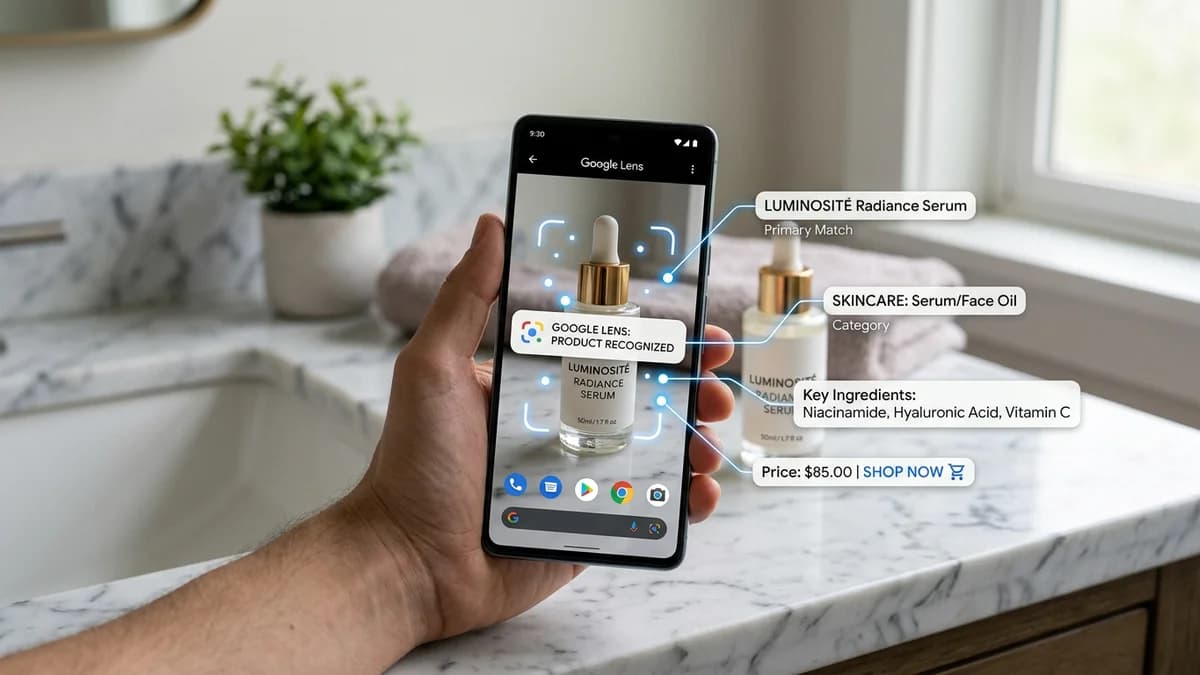
TL;DR
Google Lens processes over 20 billion visual searches per month, and a growing share of those are product searches. When a shopper points their camera at a product — or uploads a screenshot from social media — Google matches visual features against indexed product images to surface "shop similar" results. Optimizing for this means clean backgrounds, multiple angles, high-resolution images with distinctive product features clearly visible, proper image metadata, Product schema structured data, and Google Shopping feed integration. AI-generated product photography is inherently well-suited for visual search because it produces consistent, clean, studio-quality images that Google Lens can parse accurately.
Key Takeaways
- Google Lens matches visual features (shape, color, texture, pattern) against indexed product images — cluttered backgrounds and poor lighting reduce match accuracy
- Products with 5+ high-quality images from multiple angles are significantly more likely to appear in "shop similar" visual search results
- Product structured data (schema.org) with pricing and availability is a ranking signal — Google Lens prioritizes results that have rich product information
- Google Shopping feed integration is the strongest lever for visual search visibility because it directly connects your images to purchasable product data
- Mobile visual shopping behavior is growing at 30%+ year-over-year — optimizing for Google Lens now captures early traffic before your competitors adapt
- AI product photography produces the exact image characteristics that visual search algorithms prefer: consistent lighting, clean backgrounds, and sharp product edges
How Google Lens Actually Finds Products
Google Lens is a visual search engine. When a user takes a photo or uploads an image, Lens runs it through a multi-step process:
- Object detection. Lens identifies distinct objects in the image — separating the product from the background, table, hand, or other elements in the frame.
- Feature extraction. For each detected object, Lens extracts visual features: shape, color distribution, texture patterns, text on the product, logos, and distinctive design elements.
- Index matching. Those features are compared against Google's image index — billions of product images crawled from the web, Google Shopping feeds, and Google Merchant Center submissions.
- Result ranking. Matching products are ranked by visual similarity, product data completeness (price, availability, reviews), and page authority.
The output is a "shop similar" panel showing purchasable products that visually match what the user photographed. This is where your product either appears or does not.
Understanding this pipeline tells you exactly what to optimize: make your product easy to detect (clean backgrounds), make its features easy to extract (sharp details, good lighting), and make your product data complete (structured data, Shopping feed).
Clean Backgrounds and Visual Search Accuracy
The single most impactful optimization for Google Lens is background quality. When Lens tries to isolate a product in an image, a cluttered background makes object detection harder and reduces the confidence of the visual match.
What Works
- Pure white backgrounds (RGB 255, 255, 255) give Lens the clearest possible product boundary. This is why Amazon requires white backgrounds for main images — it benefits both human shoppers and visual search algorithms.
- Light neutral backgrounds (light gray, soft beige) work nearly as well. The key is high contrast between the product and the background.
- Consistent studio lighting eliminates shadows and reflections that can confuse feature extraction. Even, diffused lighting ensures that colors are accurate and textures are clearly visible.
What Hurts
- Busy lifestyle backgrounds reduce match accuracy for the main product image. A coffee mug photographed on a cluttered kitchen counter is harder for Lens to isolate than the same mug on a white backdrop.
- Multiple products in one frame can confuse object detection. Lens may extract features from the wrong object.
- Heavy shadows and reflections alter the perceived shape and color of the product, leading to less accurate visual matches.
This does not mean you should avoid lifestyle photography. Lifestyle images are valuable for conversion and for platforms like Pinterest and Instagram. But your primary product images — the ones that feed into Google's index — should have clean, uncluttered backgrounds.
If you are using AI product photography tools like AIOE, this is handled automatically. AI-generated studio shots come with controlled lighting and clean backgrounds by default, which is one reason AI product photos tend to perform well in visual search.
Multiple Angles Multiply Your Visibility
Google Lens users photograph products from unpredictable angles. Someone might snap a photo of a bag from the side, a shoe from above, or a bottle from a three-quarter angle. If your only indexed image is a straight-on front view, and the user's photo is from a different perspective, the visual match weakens.
Angle Coverage Strategy
For maximum visual search visibility, include at least these angles in your product image set:
| Angle | Purpose | Visual Search Benefit | |-------|---------|----------------------| | Front view | Primary identification | Matches the most common user photo angle | | Side profile | Shows depth and form | Catches lateral visual searches | | Three-quarter view | Shows dimensionality | Most natural real-world photo angle | | Back view | Shows labels, features | Matches photos of products "in the wild" | | Top-down / flat lay | Shows shape from above | Matches desk/table photos | | Close-up detail | Shows texture, material, finish | Matches zoomed-in searches for specific features |
Each additional angle gives Google Lens another reference point to match against. Products with 5-8 images from different perspectives are statistically more likely to appear in visual search results than products with 1-2 images.
For practical image optimization specs, see our product image size guide for the right dimensions across every platform.
Making Distinctive Features Visible
Google Lens extracts and matches on distinctive visual features — the unique design elements that differentiate your product from similar ones. If those features are not clearly visible in your images, Lens cannot match on them.
What Counts as a Distinctive Feature
- Unique patterns or prints — A floral pattern, geometric design, or brand-specific motif.
- Logo placement and design — Lens recognizes logos and uses them for brand matching.
- Hardware details — Zippers, buckles, buttons, clasps, and other metallic elements.
- Color-specific elements — A red sole on a black shoe, a colored lid on a white bottle.
- Shape silhouette — The overall outline of the product, especially for products with distinctive forms (uniquely shaped bottles, ergonomic tools, designer furniture).
How to Photograph for Feature Extraction
- Ensure distinctive elements are in sharp focus. Use sufficient depth of field so that logos, patterns, and details are not blurred.
- Light distinctive features specifically. If your product has a textured surface or metallic hardware, ensure the lighting reveals it rather than washing it out.
- Include at least one close-up image focused on the key distinctive feature. A cropped detail shot gives Lens a high-resolution reference for that specific element.
- Avoid obstructing distinctive features with props or hands. In lifestyle images, make sure the key visual features are still fully visible.
Image Metadata for Visual Search
Image metadata provides machine-readable context that helps Google connect your images to the right products. While metadata is not as impactful as visual quality, it provides signals that reinforce the visual match.
File Name
Descriptive, keyword-rich file names tell Google what the image contains before it even processes the pixels. Use lowercase, hyphen-separated names:
- Good:
blue-ceramic-coffee-mug-12oz-front-view.webp - Bad:
IMG_4392.jpg
Alt Text
Alt text is the strongest textual signal for image search ranking. Write specific, natural descriptions:
- Good:
Handmade blue ceramic coffee mug, 12oz, with speckled glaze and curved handle, front view - Bad:
product imageorcoffee mug buy cheap
For a complete guide to alt text and image SEO, see our product image SEO guide.
EXIF Data Considerations
Strip unnecessary EXIF data (GPS coordinates, camera serial numbers) for privacy, but consider retaining color profile information (sRGB). Google uses color profile data to render images accurately, and accurate color rendering improves visual match quality.
Structured Data: The Google Lens Ranking Signal
Product structured data (schema.org markup) is not just for regular search results — it directly influences Google Lens ranking. When Lens finds a visual match, it prioritizes results that have complete product information: name, price, availability, brand, and reviews.
Minimum Product Schema for Visual Search
{
  "@context": "https://schema.org",
  "@type": "Product",
  "name": "Handmade Blue Ceramic Coffee Mug - 12oz",
  "image": [
    "https://example.com/images/blue-ceramic-mug-front.webp",
    "https://example.com/images/blue-ceramic-mug-side.webp",
    "https://example.com/images/blue-ceramic-mug-detail.webp",
    "https://example.com/images/blue-ceramic-mug-lifestyle.webp"
  ],
  "description": "Hand-thrown ceramic coffee mug with speckled blue glaze, 12oz capacity.",
  "brand": {
    "@type": "Brand",
    "name": "Clay & Craft"
  },
  "offers": {
    "@type": "Offer",
    "price": "28.00",
    "priceCurrency": "USD",
    "availability": "https://schema.org/InStock",
    "url": "https://example.com/products/blue-ceramic-mug"
  },
  "aggregateRating": {
    "@type": "AggregateRating",
    "ratingValue": "4.7",
    "reviewCount": "142"
  }
}
Why This Matters for Visual Search
When a Google Lens user sees the "shop similar" results panel, they see product images alongside prices, ratings, and store names. Results without pricing or availability data are less likely to be shown because Google cannot present them as actionable shopping results. Complete structured data means your product appears with full shopping information, making it both more likely to be shown and more likely to be clicked.
Key fields for visual search ranking:
imagearray — Include all product images. More images mean more visual matching opportunities.offers.priceandoffers.availability— Required for shopping results. Without these, your product may appear in "visually similar" but not in "shop this look" results.brand.name— Google uses brand information to group and rank results.aggregateRating— Ratings displayed in visual search results increase click-through rates significantly.
Google Shopping Integration
The most powerful lever for Google Lens product visibility is Google Merchant Center (Google Shopping feed). Products submitted through Merchant Center are directly indexed for visual search, not just crawled from the web. This gives them priority in Lens results.
How the Feed Connects to Visual Search
When you submit a product feed to Google Merchant Center, Google:
- Indexes your product images at high priority.
- Associates each image with verified product data (price, availability, shipping, brand).
- Includes your products in Google Shopping, Google Images shopping results, and Google Lens "shop similar" results.
- Monitors your images for quality and can suppress products with low-quality photos.
Feed Image Requirements
| Requirement | Specification | |-------------|--------------| | Minimum resolution | 100x100px (250x250px for apparel) | | Recommended resolution | 1500x1500px or higher | | Format | JPEG, PNG, WebP, GIF, BMP, TIFF | | File size | Under 16MB | | Background | White or transparent preferred | | Content | Product only (no promotional text, watermarks, or logos overlaid) | | URL | HTTPS, publicly accessible, no more than one redirect |
Optimization Tips for Merchant Center
- Submit multiple images per product. The
additional_image_linkattribute supports up to 10 additional images. Use them all. - Use the highest resolution you have. Google's visual matching is more accurate with high-resolution images.
- Match your feed images to your landing page images. If Google detects a mismatch between the feed image and the product page image, it may flag or suppress the listing.
- Monitor the Diagnostics tab. Google Merchant Center flags image quality issues — blurry images, images with promotional overlays, incorrect aspect ratios. Fix flagged issues promptly because they reduce your visual search visibility.
Reverse Image Search and Brand Protection
Google Lens works in both directions. Shoppers use it to find your products, but you can also use it to monitor how your product images appear across the web.
Monitoring Your Visual Presence
- Search for your own products with Google Lens. Take a photo of your product and run it through Lens. See which results appear. Are your listings showing up? Are competitors or counterfeit sellers appearing with similar-looking products?
- Check for unauthorized image use. If other sellers are using your product images without permission, Google Lens will surface their listings. This is common on platforms like AliExpress, Wish, and Facebook Marketplace.
- Assess your visual competition. When you search your product through Lens, the other results show you exactly who you are competing against in visual search. Study their images to understand what Google considers visually similar.
Protecting Your Images
- Register trademarks visible in your product images (logos, brand names). Trademarked elements are enforceable regardless of the image copyright status.
- Use consistent, high-quality brand photography that is difficult to replicate. AI-generated studio images with distinctive styling create a visual brand identity that is harder for counterfeiters to copy convincingly.
- File DMCA takedowns for unauthorized use of your product images on competing listings.
Mobile Visual Shopping Behavior
Understanding how shoppers actually use visual search informs what to optimize. The behavior patterns are specific:
How Shoppers Use Google Lens for Products
- See-and-search. A shopper sees a product in a physical store, at a friend's house, or in a social media post. They take a photo and search for it on Google Lens to find the best price or a specific variant.
- Screenshot shopping. A shopper screenshots a product from Instagram, TikTok, or Pinterest and feeds the screenshot into Google Lens to find where to buy it.
- Comparison shopping. A shopper photographs a product they are considering and uses Lens to find visually similar alternatives at different price points.
- Brand identification. A shopper sees a product without clear branding and uses Lens to identify what it is and where to buy it.
What This Means for Your Images
- Your images need to match how products appear in the real world. If someone photographs your product in natural lighting on a table, Google Lens needs to match that photo against your studio images. Multiple angles and lighting conditions increase match probability.
- Lifestyle images on social media drive visual searches. When your product appears in an Instagram post and someone screenshots it, Lens tries to match the cropped, possibly filtered image against your product photos. Clean, distinctive product images with strong visual features are more likely to match even against low-quality screenshots.
- Price and availability influence which match gets clicked. Even if your product has the best visual match, if your competitor's result shows a lower price with "In Stock" and yours shows no pricing data, the competitor gets the click. Complete structured data is not optional.
Optimizing for "Shop Similar" Results
The "shop similar" panel is the primary shopping interface within Google Lens. When Lens detects a product, it shows a carousel of purchasable alternatives. Getting your product into this carousel requires a combination of visual quality and data completeness.
The Ranking Factors for "Shop Similar"
- Visual similarity score — How closely your product image matches the user's query image. Higher quality, more angles, and cleaner backgrounds improve this score.
- Product data completeness — Price, availability, brand, ratings. Complete data is required for inclusion.
- Google Merchant Center standing — Products in an active, healthy Merchant Center account are prioritized over products discovered through crawling.
- Page quality — The authority and quality of the landing page behind the product. Fast-loading, mobile-friendly pages with good Core Web Vitals score higher.
- Review signals — Products with aggregate ratings appear more prominently and get higher click-through rates.
Actionable Steps
- Submit your products to Google Merchant Center with complete data and high-resolution images.
- Ensure every product has at least 5 images (main + 4 additional angles) with clean backgrounds.
- Implement Product schema on every product page with full pricing, availability, and rating data.
- Maintain strong Core Web Vitals — particularly LCP (Largest Contentful Paint) under 2.5 seconds.
- Collect and display customer reviews to generate aggregate rating data.
AI Photography and Visual Search Compatibility
AI-generated product photography is particularly well-suited for visual search optimization because it inherently produces images with the characteristics that Google Lens rewards.
Why AI Product Photos Perform Well in Visual Search
| Visual Search Factor | Traditional Photography Challenge | AI Photography Advantage | |---------------------|----------------------------------|-------------------------| | Clean backgrounds | Requires physical backdrop or post-production editing | Generated with perfect white backgrounds by default | | Consistent lighting | Varies with studio setup, time of day, photographer skill | Algorithmically consistent across all images | | Multiple angles | Requires repositioning product and multiple shots | Generated from any angle without reshooting | | Color accuracy | Depends on white balance settings and monitor calibration | Consistent sRGB output | | High resolution | Limited by camera and lens | Generated at specified resolution (1K, 2K, 4K) | | Sharp details | Depends on focus accuracy, aperture, and stability | Consistently sharp across the full product |
Practical Workflow
- Upload your product image or URL to an AI photography tool like AIOE.
- Generate a set of 5-8 images covering multiple angles and at least one lifestyle context.
- Use the white-background variants as your primary product images for Google Shopping, Amazon, and your website.
- Use the lifestyle variants for social media, where they drive screenshot-based visual searches.
- Ensure all images are accompanied by proper alt text, file names, and Product schema.
For a complete guide to AI product photography, see our AI product photography guide.
Measuring Visual Search Performance
Google does not provide a dedicated "visual search" analytics dashboard, but you can track visual search performance through several proxies.
Google Search Console
In Google Search Console, filter by Search Type: Image. Look for:
- Impressions and clicks from queries that match visual search patterns (product names, "similar to," brand names).
- Landing pages receiving image search traffic — these are the pages Google is associating with visual search results.
Google Merchant Center
In Merchant Center, review the Performance tab. Filter by traffic source to see clicks from Google Images and Google Lens specifically. This is the most direct measurement of visual search traffic to your products.
Google Analytics
Track traffic from google / images and google / lens referral sources. If you see growth in image-referred traffic to product pages, your visual search optimization is working.
Conversion Tracking
Visual search traffic typically converts at a higher rate than standard search traffic because the user has already seen the product visually and is seeking it intentionally. Track conversion rates segmented by traffic source to quantify the ROI of visual search optimization.
Frequently Asked Questions
How does Google Lens find products to show in visual search results?
Google Lens detects objects in the user's photo, extracts visual features (shape, color, texture, patterns, logos), and matches them against its index of product images. Results are ranked by visual similarity, product data completeness (price, availability, reviews), Google Merchant Center status, and landing page quality. Products with clean backgrounds, high-resolution images from multiple angles, and complete structured data are most likely to appear.
Do I need Google Shopping to appear in Google Lens results?
You do not strictly need a Google Shopping feed. Google Lens also matches against images it discovers through regular web crawling. However, products in Google Merchant Center are directly indexed and prioritized for shopping results. A Merchant Center listing with complete product data and high-quality images significantly outperforms a product that Google only knows about through crawling your website.
What image background works best for Google Lens?
White or light neutral backgrounds work best for visual search matching. They give Google Lens the clearest product boundary for object detection and feature extraction. Lifestyle images are valuable for social media and conversion, but your primary product images — the ones indexed for visual search — should have clean, high-contrast backgrounds. If you sell on Amazon (which requires white backgrounds for main images), those same images work well for Google Lens.
How many product images should I have for visual search optimization?
At minimum, 5 images per product: front view, side profile, three-quarter view, back view, and one close-up detail shot. More angles give Google Lens more reference points for matching. Products with 5-8 high-quality images from different perspectives are significantly more visible in visual search than products with 1-2 images. Each image should be at least 1500x1500px.
Does alt text affect Google Lens results?
Not directly. Google Lens matching is primarily visual — it compares image features, not text. However, alt text and surrounding page content help Google understand what your image represents, which influences which product data gets associated with the visual match. Good alt text improves your regular image search ranking, which indirectly increases the likelihood of your images being indexed and available for Lens matching.
Can AI product photos be detected by Google Lens as AI-generated?
Google has not indicated that it penalizes AI-generated images in visual search results. Google Lens matches on visual features regardless of how the image was created. AI-generated product photos that accurately represent the actual product are treated the same as traditional photographs in visual search. The key requirement is that the images truthfully represent the product the customer will receive.