

Product Image Size Guide: Every Marketplace
Product image size guide for every major marketplace. Find exact dimensions, formats, and aspect ratios for Amazon, Etsy, Shopify, TikTok Shop, and more.
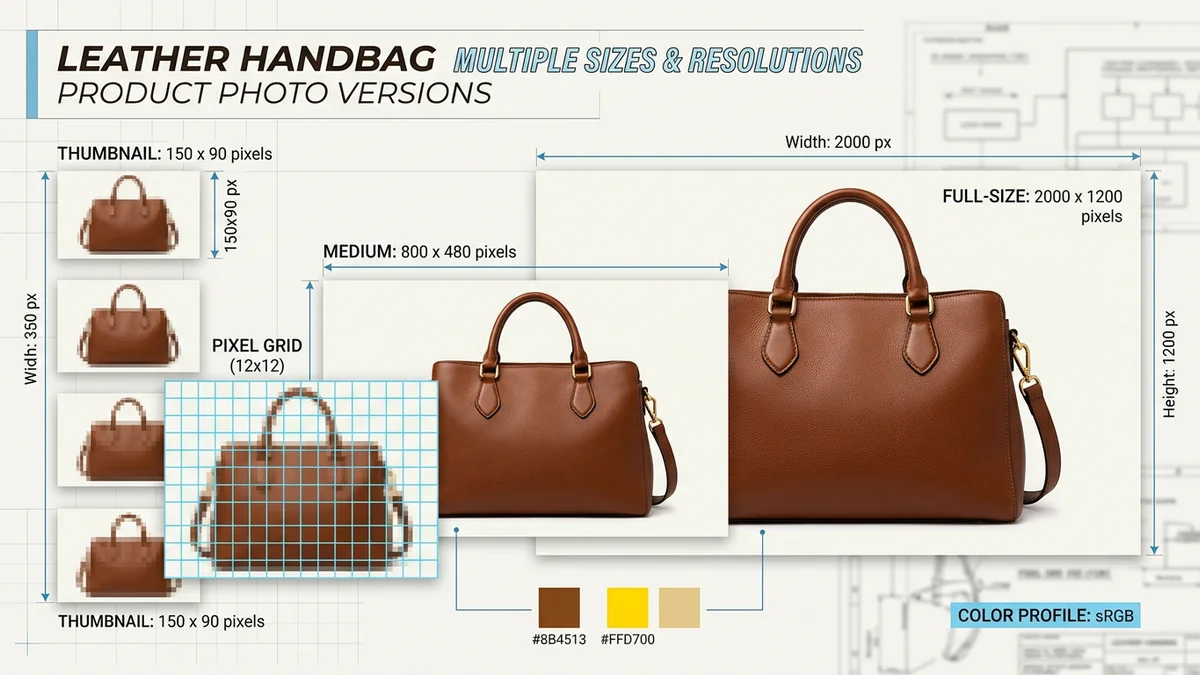
TL;DR
Every marketplace has different image size requirements, and getting them wrong means rejected uploads, blurry thumbnails, or wasted ad spend. This guide covers the exact dimensions, file formats, aspect ratios, and file size limits for Amazon, eBay, Etsy, Shopify, TikTok Shop, Walmart, Google Shopping, Pinterest, Instagram, and Facebook Marketplace — all in one reference. The short version: shoot at 2000x2000px minimum in sRGB, save as JPEG or PNG under 10MB, and you will meet 90% of requirements across all platforms. AI tools can auto-resize and reformat for each marketplace automatically.
Key Takeaways
- Amazon, Walmart, and Google Shopping all require a minimum of 1000px on the longest side — 2000px+ is recommended across the board
- Square (1:1) is the safest default aspect ratio for most marketplaces, but TikTok Shop and Pinterest favor portrait (9:16 and 2:3)
- JPEG and PNG are universally accepted; WebP is supported by Shopify and Google Shopping but not Amazon or eBay
- File size limits range from 5MB (TikTok Shop) to 20MB (Shopify) — keep images under 5MB to be safe everywhere
- Main images almost always require a white or neutral background; secondary images allow lifestyle and infographic content
- AI product photography tools can generate images at the correct dimensions for each platform from a single source photo
Why Image Sizes Matter More Than You Think
Product image dimensions are not a technicality you can ignore. Getting them wrong causes three real problems:
- Rejected uploads. Amazon, Walmart, and Google Shopping enforce minimum pixel requirements. Images below the threshold will not upload at all, or they will upload but get suppressed from search results.
- Poor display quality. An image that meets the minimum but falls short of the recommended resolution will look blurry on high-density mobile screens and will not support zoom functionality. On Amazon, listings without zoom-enabled images convert measurably worse.
- Inconsistent cross-platform presence. If you sell on multiple marketplaces (and most serious sellers do), uploading the same image everywhere without adjusting dimensions means it will look wrong on at least one platform. A landscape image designed for eBay will get cropped awkwardly on Pinterest. A portrait image optimized for TikTok Shop will have massive white bars on Amazon.
The solution is understanding what each platform requires and then producing images that either meet all requirements simultaneously or are tailored per platform.
The Master Reference Table
This table covers every major marketplace's primary product image requirements as of early 2026. Bookmark it.
| Platform | Minimum Size | Recommended Size | Max File Size | Formats | Main Image Background | |----------|-------------|-----------------|---------------|---------|----------------------| | Amazon | 1000px (longest side) | 2000x2000px | ~10MB | JPEG, PNG, TIFF, GIF | Pure white (RGB 255,255,255) | | eBay | 500x500px | 1600x1600px | 12MB | JPEG, PNG | White or light neutral preferred | | Etsy | 2000px (shortest side) | 2700x2025px (4:3) | 1MB per listing photo | JPEG, PNG, GIF | Any (shop consistency matters) | | Shopify | No hard minimum | 2048x2048px | 20MB | JPEG, PNG, WebP, GIF, HEIC | Consistent within your store | | TikTok Shop | 600x600px | 1200x1600px (3:4) | 5MB | JPEG, PNG | White background required | | Walmart | 1000px (shortest side) | 2000x2000px | 5MB | JPEG, PNG | Pure white required for main | | Google Shopping | 100x100px (250x250 for apparel) | 1500x1500px+ | 16MB | JPEG, PNG, WebP, GIF, BMP, TIFF | White or transparent preferred | | Pinterest | 600x900px | 1000x1500px (2:3) | 20MB | JPEG, PNG | Any (lifestyle performs best) | | Instagram Shopping | 320x320px | 1080x1080px | 30MB | JPEG, PNG | Any (lifestyle performs best) | | Facebook Marketplace | 600x600px | 1200x1200px | 10MB | JPEG, PNG | Any (white or clean preferred) |
A few things jump out. Amazon and Walmart are the strictest — pure white backgrounds, high minimums, specific format requirements. Shopify and Pinterest are the most permissive. And most platforms cluster around 1000-2000px as the practical sweet spot.
For a deep dive into Amazon specifically, see our complete Amazon product image requirements guide.
Aspect Ratios: Square vs Portrait vs Landscape
Choosing the right aspect ratio is just as important as hitting the right pixel count. Each marketplace displays images differently, and mobile screens (where most shopping happens) favor certain ratios over others.
Square (1:1)
Square is the universal safe choice. It works on every platform without cropping and displays consistently across desktop and mobile. If you are creating a single set of images for use across multiple marketplaces, start with square.
Best for: Amazon, eBay, Shopify, Walmart, Facebook Marketplace, Google Shopping
Recommended size: 2000x2000px
Portrait (2:3 or 3:4 or 4:5 or 9:16)
Portrait images take up more vertical screen real estate on mobile, which means they are more visually dominant in feeds and search results. TikTok Shop, Pinterest, and Instagram all favor portrait ratios.
| Ratio | Use Case | Recommended Size | |-------|----------|-----------------| | 2:3 | Pinterest pins, lifestyle shots | 1000x1500px | | 3:4 | TikTok Shop main images | 1200x1600px | | 4:5 | Instagram feed, Facebook feed | 1080x1350px | | 9:16 | TikTok/Instagram Stories, vertical ads | 1080x1920px |
Best for: TikTok Shop (3:4), Pinterest (2:3), Instagram (4:5), apparel on any platform
Landscape (3:2 or 16:9)
Landscape is the least common for product images but has specific uses: product comparison images, banner ads, A+ Content modules on Amazon, and wide products that look unnatural in square framing.
| Ratio | Use Case | Recommended Size | |-------|----------|-----------------| | 3:2 | Wide products, comparison layouts | 2000x1333px | | 16:9 | Hero banners, A+ Content, video thumbnails | 1920x1080px | | 970:600 | Amazon A+ header module | 970x600px |
Best for: Amazon A+ Content, Shopify hero banners, eBay listing descriptions, products wider than they are tall
Platform-by-Platform Breakdown
Amazon
Amazon is the most prescriptive marketplace for image requirements. The rules are strict, enforcement is automated, and non-compliant images get rejected or cause listing suppression.
Main image:
- Pure white background (RGB 255, 255, 255) — non-negotiable
- Product fills at least 85% of the frame
- No text, logos, watermarks, badges, or borders
- Minimum 1000px on the longest side; 1600px+ recommended for zoom
- Square (1:1) recommended for most categories
Secondary images (slots 2-9):
- Same resolution requirements as main image
- Lifestyle, infographic, comparison, and detail shots allowed
- Text overlays and callouts permitted
- Props and backgrounds allowed
A+ Content modules:
- Standard header: 970x600px
- Image + text: 300x300px
- Comparison chart: 150x150px per product
- Four-image row: 220x220px each
- Premium full-width: 1464x600px
Format: JPEG, PNG, TIFF, non-animated GIF. No WebP.
File size: Keep under 10MB. Practical sweet spot is 500KB-3MB.
For the full breakdown including category-specific requirements, see our Amazon product image requirements guide.
eBay
eBay is more relaxed than Amazon but still has clear standards. The biggest issue sellers face is uploading low-resolution images that look fine on their computer but appear blurry in eBay's responsive layout.
Main image:
- Minimum 500x500px, but 1600x1600px is strongly recommended
- White or light neutral background preferred (not strictly required)
- No borders, watermarks, or promotional text
- Product should be the dominant element in the frame
Gallery and secondary images:
- Up to 24 images per listing (12 standard + 12 in description)
- All formats and styles allowed in secondary positions
- Lifestyle, multi-angle, detail, and size reference shots recommended
Format: JPEG, PNG. eBay's upload tool sometimes converts to JPEG internally.
File size: Up to 12MB per image, but smaller files load faster and perform better in search.
Key difference from Amazon: eBay does not enforce a pure white background via automated scanning. However, listings with clean white backgrounds consistently outperform those without in eBay's Best Match search algorithm.
Etsy
Etsy is unique because its buyer demographic values authenticity and craft. Clinical white background images that work on Amazon can feel sterile on Etsy. The platform rewards distinctive, styled photography.
Listing images:
- Minimum 2000px on the shortest side (Etsy's requirement is unusually high)
- Recommended 2700x2025px (landscape 4:3) or 2000x2500px (portrait 4:5)
- First image is the thumbnail — it appears in search results and should be your strongest shot
- Up to 10 images per listing
Aspect ratio: Etsy displays thumbnails at roughly 4:3 (landscape), but the full listing page shows images at the aspect ratio you upload. Many successful Etsy sellers use a mix of landscape (4:3) for the main image and portrait for detail shots.
Format: JPEG, PNG, non-animated GIF. File size limit is roughly 1MB per image (Etsy compresses aggressively on upload).
Background: Unlike Amazon, Etsy does not require white backgrounds. Styled scenes, textured surfaces, and lifestyle contexts perform well. The key is consistency across your shop — pick a style and stick with it.
Video: Etsy supports 5-15 second listing videos at up to 100MB. Use them for products that benefit from showing scale, texture, or movement.
Shopify
Shopify is not a marketplace — it is your own store — so there are no strict enforcement rules. But Shopify themes have strong opinions about image dimensions, and inconsistent image sizes create an unprofessional storefront.
Product images:
- No hard minimum, but 2048x2048px is the standard recommendation
- Maximum 20MB per image and 4472x4472px maximum dimensions
- Square (1:1) is the default for most themes
- Shopify auto-generates multiple sizes for responsive display
Theme considerations:
- Most Shopify themes crop product images to a fixed aspect ratio (usually 1:1 or 3:4)
- If your images do not match the theme's expected ratio, products will appear inconsistently in collection pages
- Check your theme's documentation for recommended image dimensions
Format: JPEG, PNG, WebP, GIF, HEIC. Shopify converts to WebP for delivery regardless of upload format.
Optimization tip: Shopify generates responsive image variants automatically. Upload the highest quality you have (up to 4472x4472px) and let Shopify handle the resizing. Do not upload pre-compressed thumbnails.
TikTok Shop
TikTok Shop is the newest major marketplace, and its image requirements reflect its mobile-first, video-first DNA. Portrait images dominate because TikTok's interface is designed for vertical content.
Main image:
- Minimum 600x600px; recommended 1200x1600px (3:4 portrait)
- White background required for the main product image
- No promotional text, watermarks, or borders
- Product must be clearly visible and fill most of the frame
Secondary images:
- Up to 9 images per product
- Lifestyle and in-use images strongly recommended
- Text overlays allowed on secondary images
Format: JPEG, PNG only. Maximum 5MB per image.
Key difference: TikTok Shop's algorithm heavily favors listings with video content alongside images. A listing with 5 strong images and a 15-second product video will significantly outperform one with 9 images and no video. If you are investing in TikTok Shop, budget for video as well.
Walmart Marketplace
Walmart's requirements closely mirror Amazon's, which makes sense — they are directly competing for the same sellers and shoppers.
Main image:
- Minimum 1000px on the shortest side (note: shortest, not longest)
- Recommended 2000x2000px
- Pure white background required
- No text, logos, or promotional content on the main image
- Product must fill at least 80% of the frame
Secondary images:
- Up to 10 images per product (including main)
- Lifestyle, feature callout, and detail images allowed
- Same resolution requirements as main image
Format: JPEG or PNG only. Maximum 5MB per image.
Key difference from Amazon: Walmart's minimum applies to the shortest side (not the longest), which means landscape-oriented products need more pixels than you might expect. A product that passes Amazon's minimums might fail Walmart's.
Google Shopping
Google Shopping (Google Merchant Center) has the most lenient technical requirements but the most sophisticated automated quality scoring. Google's algorithms evaluate image quality and penalize listings with poor images through lower ad placement and reduced visibility.
Product images:
- Minimum 100x100px (250x250px for apparel) — but this minimum is far too low for competitive listings
- Recommended 1500x1500px or higher
- No watermarks, promotional text, or logos overlaid on the image
- Product must be clearly visible against the background
Background: White or transparent preferred. Google's image quality algorithm favors clean, uncluttered product images for Shopping ads and free listings.
Format: JPEG, PNG, WebP, GIF, BMP, TIFF. Google is the most format-flexible marketplace.
File size: Up to 16MB, but Google compresses images for delivery. Upload high quality and let Google handle optimization.
Feed requirements: Images are submitted via your product feed (typically through Google Merchant Center). The image_link must be publicly accessible, use HTTPS, and not redirect more than once. Broken or slow-loading image URLs will get your products disapproved.
Pinterest Shopping
Pinterest is a visual discovery platform, and its shopping features are tightly integrated into the standard browsing experience. Product Pins appear alongside organic content, so your product images compete with editorial and lifestyle photography.
Product Pins:
- Minimum 600x900px (2:3 portrait)
- Recommended 1000x1500px
- Portrait (2:3) dramatically outperforms square and landscape in Pinterest's feed
- Maximum 20MB per image
Format: JPEG, PNG.
Background: Lifestyle and styled images significantly outperform white background images on Pinterest. This is the opposite of Amazon. On Pinterest, context sells.
Text overlay: Pinterest penalizes images with excessive text overlay in its distribution algorithm. Keep text to a minimum — your pin description and title handle the messaging.
Instagram Shopping
Instagram Shopping tags products in regular posts and Stories, meaning your product images live inside a social feed. They need to feel native, not like marketplace listings.
Feed posts:
- Minimum 320x320px; recommended 1080x1080px (square) or 1080x1350px (4:5 portrait)
- 4:5 portrait takes up the most feed real estate and tends to perform best
- Maximum 30MB per image
Stories and Reels:
- 1080x1920px (9:16 portrait) recommended
- Products tagged in Stories need to be clearly visible in the first frame
Format: JPEG, PNG.
Background: Lifestyle and editorial images perform best. Product-only white background images feel out of place in a social feed. Invest in contextual, scroll-stopping imagery for Instagram.
Facebook Marketplace
Facebook Marketplace is the least prescriptive major platform, but image quality still directly impacts visibility and trust.
Product images:
- Minimum 600x600px; recommended 1200x1200px
- Square (1:1) preferred for consistent display in the marketplace grid
- First image is the thumbnail — make it count
- Up to 10 images per listing
Format: JPEG, PNG. Maximum 10MB.
Background: Clean backgrounds (white or simple) with good lighting perform best. Marketplace buyers are comparing dozens of listings in a grid view, so your product needs to be immediately identifiable at thumbnail size.
Main Image vs Secondary Image: What Changes
Across most marketplaces, the rules split cleanly between main images and secondary images.
Main image rules (generally):
- White or neutral background (required on Amazon, Walmart, TikTok Shop)
- Product only — no props, accessories, text, or graphics
- Product fills 80-85%+ of the frame
- Highest possible resolution
Secondary image rules (generally):
- Any background (lifestyle, studio, outdoor, styled)
- Text overlays, feature callouts, and infographics allowed
- Props, scale references, and accessories shown
- Multiple products or angles acceptable
The main image is about clarity and compliance. Secondary images are about storytelling and conversion. You need both.
Mobile Display Considerations
Over 70% of e-commerce traffic now comes from mobile devices, and mobile screens change how your images perform in two critical ways.
Thumbnail Size
In marketplace search results, your product image appears as a small thumbnail — often as small as 150x150px on mobile. At that size, small text, subtle details, and complex compositions are invisible. Your main image needs to read clearly at 150px: a single product, clean background, strong contrast.
Test your images by viewing them at thumbnail size before uploading. If you cannot immediately identify the product, simplify the composition.
Zoom Behavior
On Amazon and eBay, customers can pinch-to-zoom on mobile. This only works if your image is high-resolution (1600px+ on the longest side for Amazon, 1600px+ for eBay). If the image is too small, the zoom feature is disabled and customers cannot inspect details. This kills conversion for products where texture, material quality, or label readability matters.
Aspect Ratio on Mobile
Portrait images take up more screen space in mobile feeds (TikTok, Pinterest, Instagram). Square images display consistently across all platforms. Landscape images get squeezed into small strips on mobile and are almost never the right choice for product photography in mobile-first contexts.
If you sell on Pinterest, TikTok Shop, or Instagram, invest in portrait variations of your key product images.
File Format Deep Dive
JPEG
The universal standard. Every marketplace accepts JPEG. It uses lossy compression, so some quality is lost each time you save, but at quality 85-90 the loss is imperceptible to human eyes. JPEG is the best choice for photographs, product images, and lifestyle shots.
Use JPEG when: You need broad compatibility, small file sizes, or are uploading photographic images.
Quality setting: Save at 85-90% quality. Below 80%, compression artifacts become visible. Above 95%, file sizes balloon with no perceptible quality improvement.
PNG
Lossless compression — no quality loss, but larger files. PNG supports transparency, which is useful for product images on transparent backgrounds (some platforms support this). PNG is also better for images with sharp edges, text, or flat graphics.
Use PNG when: Your image contains text overlays or sharp graphic elements, or when you need transparency.
WebP
Google's modern format. Smaller files than JPEG at equivalent quality. Supported by Shopify, Google Shopping, and most web browsers. Not accepted by Amazon, eBay, or TikTok Shop for direct upload.
Use WebP when: Optimizing for your own Shopify store or website. Do not use it for marketplace uploads unless the platform explicitly accepts it.
TIFF
Lossless, uncompressed. Massive files. Supported by Amazon and Google Shopping but rarely practical. Some professional photographers deliver in TIFF and you may need to convert to JPEG before uploading.
GIF
Non-animated GIF is technically accepted by a few platforms but offers no advantages. Animated GIF is not accepted for product images on any major marketplace. Skip it.
File Size Limits Compared
File size limits vary significantly across platforms. If you create images for multiple marketplaces, you need to hit the most restrictive limit.
| Platform | Max File Size | Practical Target | |----------|--------------|-----------------| | TikTok Shop | 5MB | Under 3MB | | Walmart | 5MB | Under 3MB | | Amazon | ~10MB | Under 3MB | | Facebook Marketplace | 10MB | Under 5MB | | eBay | 12MB | Under 5MB | | Google Shopping | 16MB | Under 5MB | | Shopify | 20MB | Under 5MB | | Pinterest | 20MB | Under 5MB | | Instagram | 30MB | Under 5MB | | Etsy | ~1MB (aggressive compression) | Under 1MB |
The safe universal target is under 3MB per image. A 2000x2000px JPEG saved at quality 85-90 typically lands between 500KB and 2.5MB, which falls within every platform's limits.
Etsy is the outlier — it compresses images aggressively on upload. Upload at the highest quality you can (even if the file is larger) and let Etsy's compression do its work. The quality on the listing page will still be better than if you pre-compress.
How to Resize Efficiently for Multiple Platforms
Selling on 3+ marketplaces means you need the same product in different dimensions. Doing this manually in Photoshop is tedious. Here are the practical approaches, from manual to fully automated.
The Universal Base Image Approach
Start with one high-resolution master image: 3000x3000px or larger, square, on a white background, saved as PNG or high-quality JPEG. From this master, create derivatives for each platform:
- Amazon/Walmart/eBay: Crop or use as-is at 2000x2000px (square)
- TikTok Shop: Crop to 1200x1600px (3:4 portrait), ensuring the product is centered
- Pinterest: Crop to 1000x1500px (2:3 portrait)
- Instagram: Use at 1080x1080px (square) or crop to 1080x1350px (4:5)
- Shopify: Upload the full 3000x3000px master and let Shopify resize
This approach requires creating the crops once per product. For 10 products, that is manageable. For 100+ products, you need automation.
Batch Resizing Tools
Adobe Photoshop Actions/Batch Processing: Create an action for each marketplace's dimensions, then run it on a folder of images. Effective but requires Photoshop expertise and a license.
Canva Resize (Magic Resize): Canva's paid plan includes a resize feature that adapts an image to multiple dimensions. Good for small catalogs.
Command-line tools (ImageMagick/Sharp): For developers or sellers comfortable with the terminal, ImageMagick or Sharp can batch-resize thousands of images with a single command. This is the fastest option for large catalogs.
AI Auto-Formatting
AI product photography tools — including AIOE — can generate images at the exact dimensions required for each marketplace. Instead of creating one master image and manually deriving variants, you tell the AI which platform you are targeting and it outputs the correct dimensions, aspect ratio, and file format.
This is the most efficient approach for sellers on 3+ platforms. You upload your product once, select your target marketplaces, and receive optimized images for each. No manual cropping, no guessing at dimensions, no inconsistent framing.
For more on how AI photography compares to traditional approaches, see our AI vs traditional product photography guide.
When to Use Square vs Portrait vs Landscape
This decision tree covers 95% of use cases:
Use square (1:1) when:
- Selling on Amazon, eBay, Walmart, or Shopify
- Creating main product images
- You need one image that works across multiple platforms
- Your product is roughly symmetrical or equally wide and tall
Use portrait (2:3 or 3:4 or 4:5) when:
- Selling on TikTok Shop, Pinterest, or Instagram
- Your product is taller than it is wide (bottles, bags, clothing)
- Creating images for mobile-first platforms where vertical space matters
- Running paid ads on social platforms (portrait ads get more screen real estate)
Use landscape (3:2 or 16:9) when:
- Creating A+ Content or Enhanced Brand Content on Amazon
- Your product is significantly wider than it is tall (keyboards, toolboxes, yoga mats)
- Making comparison images or multi-product layouts
- Creating hero banners for your Shopify storefront
If in doubt, go square. You can always crop a square image into portrait or landscape, but you cannot expand a tightly cropped portrait into a usable square without losing the product.
Common Mistakes That Waste Time and Money
Uploading the Same Image Everywhere Without Adjusting
A square 2000x2000px image on Amazon looks great. That same image on Pinterest gets squeezed into a tiny square in a feed full of tall, striking portrait pins. Take the time to create platform-specific variants.
Ignoring Mobile Thumbnails
Your image looks amazing at full size on your desktop monitor. But 80% of your customers will first see it as a 150px thumbnail on their phone. Zoom out. Look at it small. If the product is not immediately recognizable, simplify.
Over-Compressing for File Size
Some sellers aggressively compress images to meet the strictest file size limits. A 2000x2000px JPEG at quality 40 is technically under 500KB but looks terrible — visible banding, color artifacts, blurry details. Quality 85+ is the floor.
Inconsistent Aspect Ratios Within a Listing
If your main image is square and your secondary images are a mix of portrait and landscape at random, the listing page looks chaotic. Pick one or two aspect ratios and use them consistently across all image slots.
Skipping High-Resolution for "It Looks Fine"
It looks fine on your screen. It will not look fine when a customer pinch-zooms on their phone to read the label on your supplement bottle. If the zoom experience is blurry, you have lost the sale. Upload at 2000px+ minimum, always.
Frequently Asked Questions
What is the single best image size that works across all marketplaces?
2000x2000px square JPEG at quality 85-90 in sRGB color space. This meets or exceeds the minimum requirements for Amazon, eBay, Etsy, Shopify, Walmart, Google Shopping, and Facebook Marketplace. For TikTok Shop, Pinterest, and Instagram, you will want additional portrait variations, but the square master image is your foundation.
Do I need different images for each marketplace or can I use the same ones?
You can use the same source images, but you should create platform-specific crops. A square image works everywhere, but platform-specific aspect ratios perform significantly better — portrait images on Pinterest get 2-3x more engagement than square ones, for example. At minimum, create a square version (marketplace listings) and a portrait version (social commerce) of your key product images.
What happens if my images are below the minimum resolution?
On most marketplaces, the upload will either fail silently or the image will be accepted but displayed at low quality without zoom functionality. On Amazon and Walmart, low-resolution images can trigger listing suppression, removing your product from search results until you upload compliant images. On Google Shopping, low-quality images reduce your Quality Score, which raises your cost-per-click in Shopping ads.
Should I upload the maximum resolution possible?
Upload the highest quality you have, up to the platform's maximum (typically 4472px on Shopify, 10000px on Amazon). Higher resolution gives platforms room to generate responsive variants for different devices. The exception is Etsy, which compresses heavily — upload high quality and let their compression handle the rest. Do not upload unnecessarily massive files (50MB TIFF files) just because you can.
What color space should I use?
sRGB. Every marketplace and web browser displays images in sRGB. If you upload images in Adobe RGB or CMYK, colors will appear washed out, shifted, or inaccurate on screen. If your photographer delivers in Adobe RGB, convert to sRGB before uploading. Most AI photography tools output in sRGB by default.
How do I know if my images will look good on mobile?
View your product image at 150x150px — that is roughly the size of a mobile search result thumbnail. If you cannot immediately identify the product, the image needs simplification: larger product, less background, stronger contrast. Also test by pinch-zooming on your phone to verify that detail shots are sharp enough for inspection. Any image under 1600px will look blurry when zoomed on a modern phone screen.
Can AI tools automatically format images for different marketplaces?
Yes. AI product photography tools like AIOE can generate images at the exact dimensions, aspect ratios, and file formats required by each marketplace. You upload your product once, select your target platforms, and receive optimized images for each. This eliminates manual cropping, format conversion, and the risk of uploading non-compliant images. For sellers on 3+ platforms, this is the most efficient workflow — see our complete guide to AI product photography for details on how it works.