

Jewelry Product Photography: Rings to Watches
Master jewelry product photography with lighting tips for gold, silver, and gemstones. Covers rings, necklaces, earrings, watches, and AI photo tools.
TL;DR
Jewelry is one of the most technically demanding product photography categories. Pieces are small, highly reflective, and depend on precise lighting to show sparkle, metal finish, and gemstone clarity. The core challenge is controlling reflections: every light source, wall, and nearby object reflects off polished metal surfaces. A basic jewelry setup requires a macro-capable lens (or phone with macro mode), diffused lighting from two sides, a clean background, and something to hold the piece in position. This guide covers lighting for different metals, gemstone photography, type-specific techniques for rings, necklaces, earrings, bracelets, and watches, plus how AI photography tools can supplement a jewelry brand's image production.
Key Takeaways
- Use diffused lighting from two sides at 45-degree angles to control reflections on polished metal -- never use bare, undiffused lights
- A macro lens or macro mode is essential for capturing gemstone facets, prong settings, and hallmarks at the detail level buyers expect
- Different metals require different lighting: warm tones for gold, cool tones for silver and platinum, neutral for rose gold
- Include model shots for scale -- rings on fingers, necklaces on necks -- because jewelry size is impossible to gauge otherwise
- White backgrounds are required for Amazon; lifestyle shots on textured surfaces work best for Etsy and brand websites
- AI photography handles background generation and scene placement well, but verify that reflections, engravings, and stone details remain accurate
Why Jewelry Photography Is Different
Most product photography follows a predictable pattern: even lighting, clean background, product in focus. Jewelry breaks that pattern because of three properties that rarely combine in other categories.
Extreme reflectivity. Polished gold, silver, and platinum act as mirrors. They reflect every object in the room -- the camera, the photographer's hands, the ceiling. Controlling what reflects off the metal surface is the central challenge.
Tiny scale. A ring is roughly 2cm across. An earring stud might be 5mm. At those scales, every fingerprint, dust speck, and hairline scratch is visible in a macro shot.
Sparkle and brilliance. Gemstones are cut specifically to interact with light. A well-photographed diamond shows fire (colored light dispersion), brilliance (white light return), and scintillation (flashing patterns). Flat, even lighting kills all three.
Macro Photography Setup
Equipment
| Equipment | Magnification | Best For | Budget | |-----------|--------------|----------|--------| | Dedicated macro lens (60-105mm) | 1:1 (life-size) | Professional results | $300-800 | | Extension tubes on standard lens | 0.5:1 to 1:1 | Affordable upgrade | $30-100 | | Clip-on macro lens for phones | ~0.5:1 | Etsy and social media | $15-40 | | Phone macro mode (iPhone 15 Pro+) | Digital close focus | Quick, convenient | Built-in |
Camera Settings
| Setting | Value | Why | |---------|-------|-----| | Aperture | f/8 to f/16 | Keeps entire piece in focus at macro distances | | ISO | 100-200 | Minimizes noise for zoomed-in viewing | | Shutter speed | 1/125+ or use tripod | Eliminates camera shake | | White balance | Custom or Kelvin-matched | Accurate metal color depends on precise WB | | Focus | Manual with focus peaking | AF hunts at macro distances |
A tripod is not optional. At macro magnification, the slightest movement blurs the shot. Use a remote shutter or 2-second timer to eliminate button-press vibration.
Holding Jewelry in Position
- Museum putty (Blu-Tack): Press pieces into a small ball, remove in post. Works for rings, brooches, pendants.
- Fishing line: Suspend necklaces and bracelets from monofilament. Nearly invisible, easy to edit out.
- Acrylic stands: Clear ring stands and necklace busts disappear against white backgrounds.
- Mannequin busts: For lifestyle shots showing how pieces are worn.
Lighting for Different Metals
Gold
Gold reflects warm tones and absorbs cool tones. Use warm lights (3200-4000K), a gold or cream reflector for fill, and avoid cool-white backgrounds that create blue reflections. Set white balance slightly warm (5000K) to preserve the golden tone.
Silver and Platinum
Silver and platinum look best with neutral to cool lights (5000-5500K) and white or silver reflectors. Create a gradient from light to dark across the surface for dimension -- completely even lighting makes silver look flat. Slightly underexpose and recover in post to preserve highlights.
Rose Gold
Use neutral lights (4500-5000K) and let the metal's pink undertone come through naturally. Avoid warm extremes (pushes toward yellow gold) and cool extremes (pushes toward copper). Check on a calibrated monitor, as rose gold shifts easily with screen calibration.
Two-Tone and Mixed Metal
Use neutral lighting (5000K) as a baseline and adjust each metal's appearance in post-processing. Avoid colored reflectors that tint both metals equally.
Gemstone Photography
Diamonds
Diamonds exhibit brilliance (white light reflection), fire (spectral color dispersion), and scintillation (alternating bright/dark areas). To capture all three: position a small, bright point light above and behind the diamond at 30-45 degrees, and use a larger diffused light from the front/side for the metal. The point light creates fire and brilliance; the diffused light handles everything else.
Colored Gemstones
Use diffused lighting to show color evenly without hot spots that wash out the hue. Backlight reveals inclusions and depth in translucent stones. Photograph against neutral gray or white -- colored backgrounds shift perceived stone color.
Opaque Stones (Turquoise, Lapis, Onyx)
Even, diffused lighting shows surface texture without glare. Get close enough to show the unique matrix (veining, inclusions). Color accuracy is critical -- turquoise ranges from sky blue to green, and buyers expect the exact shade they see.
Type-Specific Tips
Rings
Hero shot: Angle 30-45 degrees from vertical, setting facing camera, showing stone, prongs, and band in one frame. Top-down: Shows full setting design. Profile: Side view for band thickness and setting height. On-hand: A model wearing the ring communicates scale better than any measurement. Interior: Photograph hallmarks and engravings inside the band.
Necklaces
Arrange flat lays in a gentle curve with museum putty holding the chain shape. For hanging shots, drape over a mannequin bust or use invisible monofilament. Show on a model at different chain lengths if adjustable. Always photograph the clasp mechanism separately -- buyers care about clasp quality.
Earrings
Show a single earring in close-up for front design detail and the back mechanism. Present the pair symmetrically on a surface or display card. On-ear shots are essential for drop earrings, hoops, and statement pieces where length matters. Include scale context -- earrings range from 3mm studs to 80mm chandeliers.
Bracelets
The on-wrist shot is the most important image. For chain bracelets, arrange in a gentle curve on flat surfaces. Show the clasp mechanism clearly. For bangles, stand upright using museum putty or lean against a prop.
Watches
Set the time to 10:10 or 1:50 (industry convention that frames the logo symmetrically). The dial must be perfectly sharp with readable hands and indices. Show strap material in a close-up, case thickness in a profile shot, and actual wearing size on a wrist. A lume shot in darkness is a strong selling point for watches with luminous markers.
Background Choices
White Background
Required for Amazon, recommended for most marketplaces. For jewelry on white, control reflections by elevating pieces on acrylic risers, using matte white instead of glossy, and adding a subtle white-to-gray gradient for grounding. See our Amazon product image requirements guide.
Textured Surfaces
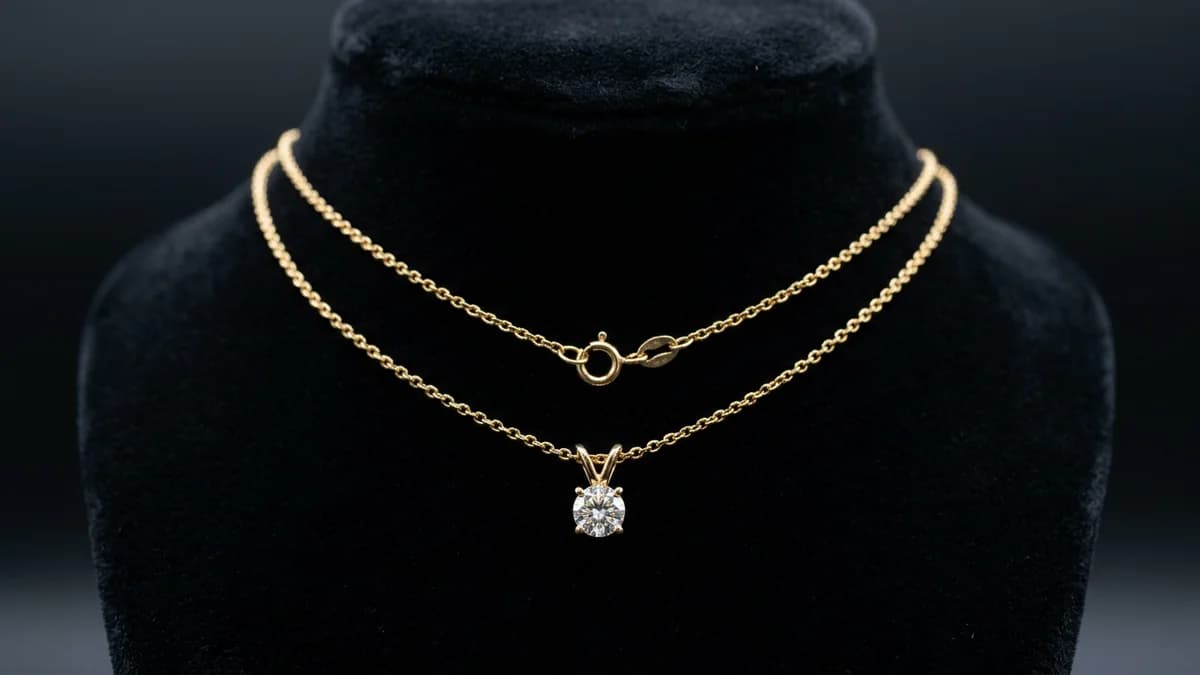
| Surface | Best For | Effect | |---------|----------|--------| | Marble (white/gray) | Silver, platinum, diamonds | Clean luxury | | Dark slate or stone | Silver, white gold | Dramatic contrast | | Light wood (oak, birch) | Gold, rose gold | Warm, artisanal | | Linen or raw silk | All metals, especially gold | Soft, bridal | | Velvet (black/navy) | All metals, diamonds | Traditional luxury |
Model vs. Standalone Shots
You need both. Standalone shots serve the functional purpose -- detail, angles, clean backgrounds for marketplace compliance. Model shots show scale, drape, and lifestyle context, and convert better for most jewelry categories.
If budget is limited, prioritize: (1) standalone hero on white or neutral, (2) on-model for scale, (3) macro close-up of setting or craftsmanship. These three give buyers minimum purchase confidence.
Retouching Jewelry Images
Standard steps: remove dust and scratches, clean up backgrounds (pure white RGB 255,255,255 for Amazon), shape metal reflections with dodge and burn, enhance gemstone contrast for brilliance, correct colors to match the physical piece, and apply targeted sharpening to edges and facets.
Do not remove intentional design elements (hammer texture, brushed finish), change metal or stone colors, add sparkle not in the original, or composite pieces that are not sold together.
AI Photography for Jewelry
Where AI Excels
Background replacement onto marble, velvet, slate, or lifestyle scenes. Tools like AIOE can generate "woman's hand wearing a gold ring on a marble counter" without hiring a model. Consistency across catalogs when launching dozens of new SKUs. Seasonal campaign scenes without reshooting.
Where to Verify Carefully
Reflections on polished metal may be unrealistic. Small text (hallmarks, engravings) can become garbled. Gemstone optical properties sometimes flatten, losing fire and brilliance. Prong and micro-pave details can blur. Always compare AI output to your original photos before publishing.
For background removal techniques, see our remove background from product photos guide.
Marketplace Requirements
| Requirement | Amazon | Etsy | Brand Website | |-------------|--------|------|---------------| | Background | Pure white (RGB 255,255,255) | Styled preferred | Brand choice | | Min resolution | 1000px longest side | 2000px shortest side | 2048px+ | | Main image | Product only | Styled hero with props | Brand choice | | Model images | Allowed (secondary) | Encouraged | Encouraged | | Image count | Up to 9 | Up to 10 | Unlimited |
For complete specs, see our Etsy product photo requirements and Amazon product image requirements guides.
Frequently Asked Questions
What lighting is best for jewelry photography?
Two diffused light sources at 45-degree angles, slightly above the piece. Softboxes or shoot-through umbrellas create soft illumination that controls reflections. Add a small undiffused accent light from above-behind for gemstone sparkle.
Do I need a macro lens for jewelry photography?
For professional marketplace listings where buyers zoom to 100%, yes. A dedicated 60-105mm macro lens produces the sharpest results for prong settings, hallmarks, and facets. For social media, phone macro mode is acceptable.
How do I avoid seeing the camera in reflective jewelry?
Use a light tent (diffused enclosure) with a small hole for the lens, replacing all visible reflections with soft white light. Alternatively, shoot from farther away with a longer focal length to reduce the camera's reflection size. Clone out remaining reflections in post.
What is the best background for jewelry product photos?
Pure white for Amazon and most marketplaces. For Etsy and brand sites: marble for silver/platinum, warm wood for gold, dark velvet or slate for dramatic contrast.
How do I photograph gemstones to show sparkle?
Combine diffused ambient light with a small point light source (bare LED, snoot) above and behind the stone. The point light refracts through the facets, producing fire (colored flashes) and brilliance (white returns). Adjust the angle in small increments for optimal effect.
Can AI generate professional jewelry photos?
AI is effective for backgrounds, lifestyle scenes, and catalog consistency. It struggles with gemstone optical properties, prong details, engraving legibility, and realistic metal reflections. Photograph professionally for hero and detail shots, then use AI for lifestyle and background variations.
How many images should a jewelry listing have?
Use every available slot: 9 for Amazon, 10 for Etsy. At minimum: hero shot, alternate angle, macro close-up, on-model/scale reference, and clasp or back detail. Fill remaining slots with lifestyle, variant comparisons, and packaging.