

7 Best AI Product Photo Tools in 2026 (Tested)
We tested the top AI product photo tools for e-commerce sellers. See how Photoroom, Pebblely, Flair AI, and AIOE compare on quality, speed, and pricing.
TL;DR
Photoroom is the overall market leader with the largest user base and best mobile experience. For Amazon and Shopify sellers who need a URL-to-image pipeline with marketplace compliance, AIOE is a strong option. Pebblely and Flair AI are solid mid-range picks for beginners and brand-focused users respectively. Your best choice depends on catalog size, budget, and how much creative control you need.
Key Takeaways
- Photoroom leads the market with 200M+ downloads and the most polished background removal, but its per-image pricing adds up at scale
- AIOE Image Generator is the only tool that scrapes a product URL and generates images end-to-end, with built-in marketplace compliance presets
- Flair AI offers the best creative control for branded lifestyle shots with reusable templates
- Claid.ai is the best choice for enterprises that need API integration and automated image enhancement at scale
- Prices range from free tiers to ~$99/mo for enterprise plans -- most sellers will spend $10-50/mo
Quick Comparison: All 7 Tools at a Glance
| Tool | Best For | Starting Price | Free Tier | URL-to-Image | Batch Generation | |------|----------|----------------|-----------|--------------|------------------| | Photoroom | Mobile users, background removal | $9.99/mo | Yes | No | Limited | | Pebblely | Beginners, small catalogs | $19/mo | 40 images/mo | No | No | | Flair AI | Branded lifestyle shots | $10/mo | Trial only | No | No | | AIOE Image Generator | Amazon/Shopify sellers, bulk catalogs | $19/mo | 10 credits | Yes | Yes | | Claid.ai | Enterprise, API integration | ~$0.10/image | No | No | Yes (API) | | Caspa AI | Social media product content | ~$19/mo | Trial only | No | Limited | | Nightjar | Budget-conscious sellers | ~$15/mo | No | No | No |
Now let's dig into each tool.
1. Photoroom -- The Market Leader
Photoroom is the most widely used AI product photography tool on the market, with over 200 million downloads across iOS and Android. It started as a background removal app and has evolved into a full AI photo studio.
Key Features
- Background removal and replacement -- Industry-leading edge detection, especially for complex products like jewelry, transparent bottles, and woven textiles.
- AI-generated scenes -- Type a scene description and Photoroom renders your product into it with realistic lighting and shadows.
- Instant Backgrounds -- A library of pre-made scene templates you can apply with one tap.
- Batch editing -- Apply the same background or style to multiple images at once (Pro plan and above).
Pricing
| Plan | Price | What You Get | |------|-------|-------------| | Free | $0 | Basic background removal, watermarked exports | | Pro | $9.99/mo | HD exports, no watermark, AI backgrounds, batch editing | | Business | $24.99/mo | Priority processing, API access, team features |
Pros
- Best-in-class background removal -- handles difficult edges better than any competitor.
- Mobile-first experience is genuinely excellent. You can create listing-ready images from your phone.
- Huge template library and active user community.
Cons
- AI scene generation quality is good but not always photorealistic -- lifestyle shots can look slightly synthetic.
- Free tier adds a watermark, which makes it unusable for actual product listings.
Best For
Mobile-first sellers who need fast background removal and quick scene swaps. If your primary need is removing or replacing backgrounds, Photoroom is the default choice.
2. Pebblely -- Simple and Beginner-Friendly
Pebblely focuses on simplicity. Upload a product photo, pick a theme, and get a styled product shot in seconds. There's no complex UI to learn and no prompt engineering required.
Key Features
- One-click scene generation -- Select from pre-built themes (kitchen, bathroom, outdoor, studio) and Pebblely handles the rest.
- Custom scene descriptions -- Type what you want if the pre-built themes don't fit.
- Multiple aspect ratios -- Generate square, portrait, or landscape images for different platforms.
- Built-in background removal -- Automatic product extraction before scene generation.
Pricing
| Plan | Price | What You Get | |------|-------|-------------| | Free | $0 | 40 images/month, standard resolution | | Pro | $19/mo | 1,000 images/month, HD resolution, priority generation | | Premium | $49/mo | Unlimited images, custom themes, priority support |
Pros
- Genuinely easy to use -- no learning curve. Upload and generate in under a minute.
- Generous free tier (40 images/month) lets you test it properly before paying.
Cons
- Limited creative control compared to Flair AI or AIOE. You get what the AI decides.
- Scene variety is narrower than competitors -- some categories (tech products, industrial goods) have fewer pre-built options.
Best For
Beginners and sellers with small catalogs (under 50 SKUs) who want decent product photos without learning a complex tool.
3. Flair AI -- Best for Branded Lifestyle Shots
Flair AI stands out for creative control. Instead of just generating a scene, you can drag and drop elements, define brand guidelines, and create reusable templates that keep your product photography consistent across your entire catalog.
Key Features
- Canvas-based editor -- Drag your product onto a canvas and position it relative to props, backgrounds, and other elements.
- Brand templates -- Save color palettes, lighting styles, and scene compositions as reusable templates.
- Style transfer -- Upload a reference image and Flair matches the lighting, mood, and composition style.
- Props and accessories -- Add complementary objects (plants, fabrics, food items) to build complete scenes.
Pricing
| Plan | Price | What You Get | |------|-------|-------------| | Free trial | $0 | Limited generations to test the platform | | Pro | $10/mo | Unlimited generations, HD export, brand templates | | Enterprise | Custom | Custom model training, API access, team collaboration |
Pros
- Best creative control of any tool on this list. The canvas editor gives you real compositional authority.
- Brand templates ensure visual consistency across hundreds of images.
- Style transfer feature is genuinely useful -- show it a photo you like and it produces similar results.
Cons
- Steeper learning curve than Pebblely or Photoroom. The canvas editor takes time to learn.
- Less effective for simple white-background product shots -- it's built for lifestyle and editorial content.
Best For
Brands and agencies that need consistent, on-brand lifestyle photography with creative control over composition and styling.
4. AIOE Image Generator -- Best for Marketplace Sellers
AIOE Image Generator (that's us) takes a different approach. Instead of starting with a product photo, you can paste a product URL -- from Amazon, Shopify, Etsy, or any e-commerce store -- and the AI scrapes the product data, generates optimized photography prompts, and produces marketplace-ready images automatically.
Full disclosure: we built this tool, so we'll be straightforward about what it does well and where it falls short.
Key Features
- URL-to-image pipeline -- Paste a product URL. AIOE scrapes the listing (product name, description, images), generates photography prompts using Claude AI, then produces images using Gemini. No manual prompt writing required.
- Marketplace compliance presets -- One-click presets for Amazon (pure white background, 85%+ fill), Shopify (square format, consistent styling), and Etsy (lifestyle-focused) that automatically apply the correct specifications.
- Batch generation -- Generate multiple styles for multiple products in a single job. Upload a CSV of URLs and get back a complete catalog shoot.
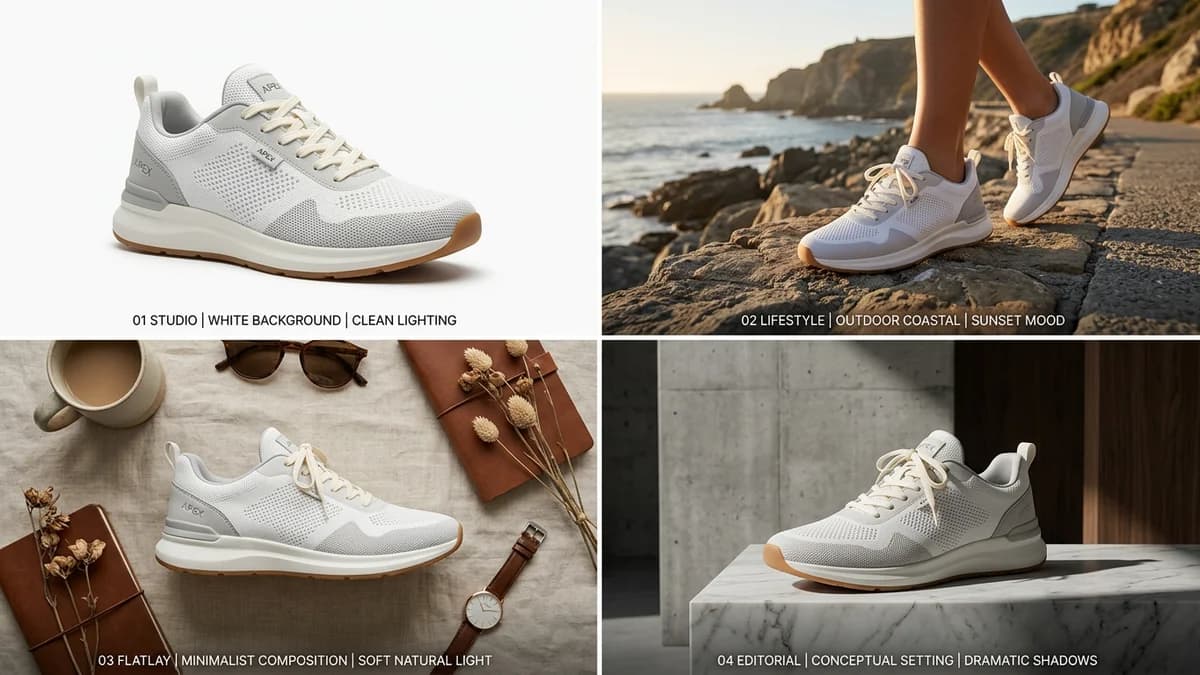
- Photography style library -- White background, lifestyle, flatlay, editorial, close-up, and custom scene descriptions. Each style is backed by tested prompt templates that produce consistent results.
Pricing
| Plan | Price | What You Get | |------|-------|-------------| | Free | $0 | 10 credits to test (1 credit = 1 standard image) | | Starter | $19/mo | 100 credits/month, all styles, 2K resolution | | Pro | $49/mo | 500 credits/month, 4K resolution, batch generation, brand profiles | | Enterprise | $99/mo | 2,000 credits/month, priority processing, dedicated support |
Pros
- The URL-to-image pipeline is a genuine time-saver. Paste a link, get images -- no photo upload or prompt writing needed. Try it free with 10 credits.
- Marketplace compliance presets eliminate guesswork about image specifications.
- Batch generation handles high-SKU catalogs efficiently.
Cons
- Newer and smaller than Photoroom -- the community and template library are still growing.
- Background removal is not as refined as Photoroom for complex product edges (transparent bottles, fine jewelry).
Best For
Amazon, Shopify, and Etsy sellers who need marketplace-compliant product photos at scale, especially those managing large catalogs where the URL-to-image pipeline and batch generation save significant time.
5. Claid.ai -- Best for Enterprise and API Integration
Claid.ai is built for businesses that need to process thousands of images programmatically. It's less of a design tool and more of an image intelligence API -- you send it product images via API, and it enhances, resizes, and generates backgrounds automatically.
Key Features
- Image enhancement API -- Upscale resolution, fix lighting, remove noise, and sharpen product images automatically.
- Background generation -- AI-generated backgrounds via API calls, with consistent styling across batches.
- Automated quality checks -- The API flags images that don't meet specified quality thresholds before they go live.
- Platform integrations -- Pre-built integrations for Shopify, WooCommerce, and other e-commerce platforms.
Pricing
| Plan | Price | What You Get | |------|-------|-------------| | API | ~$0.10/image | Pay-per-image, volume discounts available | | Enterprise | Custom | SLA, dedicated support, custom model training |
Pros
- Best API of any tool on this list. If you need programmatic image processing at scale, Claid is the clear choice.
- Image enhancement (upscaling, lighting correction) is a unique capability most competitors lack.
- Handles thousands of images per hour without manual intervention.
Cons
- Not designed for individual sellers -- there's no visual editor or drag-and-drop interface.
- Pricing is opaque beyond the per-image rate. Enterprise plans require a sales conversation.
Best For
Large e-commerce operations and agencies that need API-driven image processing and enhancement across thousands of SKUs.
6. Caspa AI -- Best for Social Media Product Content
Caspa AI focuses on generating product images specifically formatted for social media -- Instagram posts, Facebook ads, Pinterest pins, and story formats. It's less about marketplace listings and more about marketing content.
Key Features
- Social media format presets -- Generate images pre-sized for Instagram (1080x1080), Facebook ads (1200x628), Pinterest (1000x1500), and stories (1080x1920).
- Marketing copy integration -- Add text overlays, sale badges, and promotional elements directly in the generated image.
- Scene variety -- Lifestyle scenes, flat lays, and seasonal themes optimized for social engagement.
- Brand color matching -- Specify brand colors and the AI incorporates them into the scene background and lighting.
Pricing
| Plan | Price | What You Get | |------|-------|-------------| | Free trial | $0 | Limited generations | | Pro | ~$19/mo | Unlimited generations, all formats, HD export |
Pros
- Pre-sized social media formats save time compared to generating and then cropping.
- Marketing-focused features (text overlays, promotional badges) are useful for ad creative.
Cons
- Not suitable for marketplace main images -- the focus is on marketing content, not listing compliance.
- Generation quality for product detail and accuracy trails Photoroom and Flair AI.
Best For
Sellers and marketing teams who need a steady stream of social media product content across multiple platforms and ad formats.
7. Nightjar -- Best for Budget-Conscious Sellers
Nightjar offers AI product photography at a lower price point than most competitors. The quality is a step below the top tools, but for sellers who need decent product photos without spending $50+/month, it's a viable option.
Key Features
- Standard scene generation -- White background, lifestyle, and flatlay options similar to other tools.
- Simple interface -- Upload, select a style, generate. No complex settings or editors.
- Reasonable output quality -- Images are good enough for mid-tier marketplace listings and smaller Shopify stores.
- Affordable pricing -- Lower monthly cost than most alternatives.
Pricing
| Plan | Price | What You Get | |------|-------|-------------| | Basic | ~$15/mo | Standard resolution, basic styles, limited generations | | Pro | ~$35/mo | HD resolution, all styles, more generations |
Pros
- Most affordable paid option on this list for sellers who have outgrown free tiers.
- Simple and functional -- does the basics without overcomplicating things.
Cons
- Image quality noticeably trails Photoroom, Flair AI, and AIOE on complex scenes.
- Fewer style options and less creative control than competitors.
Best For
Sellers on a tight budget who need functional product photos and have outgrown the free tiers of other tools.
Full Pricing Comparison
| Tool | Free Tier | Lowest Paid | Mid Tier | Enterprise | |------|-----------|-------------|----------|------------| | Photoroom | Yes (watermarked) | $9.99/mo (Pro) | $24.99/mo (Business) | Custom | | Pebblely | 40 images/mo | $19/mo (Pro) | $49/mo (Premium) | -- | | Flair AI | Trial only | $10/mo (Pro) | -- | Custom | | AIOE Image Generator | 10 credits | $19/mo (Starter) | $49/mo (Pro) | $99/mo | | Claid.ai | No | ~$0.10/image (API) | Volume discounts | Custom | | Caspa AI | Trial only | ~$19/mo (Pro) | -- | -- | | Nightjar | No | ~$15/mo (Basic) | ~$35/mo (Pro) | -- |
A few things stand out in this pricing breakdown:
- Cheapest entry point: Flair AI at $10/month for unlimited generations is hard to beat on raw value.
- Best free tier: Pebblely gives you 40 real images per month -- enough to test it on your actual products.
- Best for high volume: Claid.ai's per-image pricing means you only pay for what you use, and it gets cheaper at scale.
- Most predictable costs: AIOE's credit-based system means you know exactly what each image costs (1-4 credits depending on resolution).
How We Tested
We evaluated each tool using the same set of 10 products across five categories: skincare bottles, electronics accessories, kitchen gadgets, apparel accessories (hats and bags), and home decor items.
For each tool, we tested:
- White background quality -- Does it produce a clean, pure white background suitable for Amazon main images?
- Lifestyle scene realism -- How natural do lifestyle shots look? Are shadows, reflections, and lighting consistent?
- Product accuracy -- Does the AI preserve the product's shape, color, and proportions, or does it hallucinate details?
- Speed -- Time from upload to finished image.
- Ease of use -- How many clicks to go from product photo to exported image?
- Marketplace compliance -- Can the output pass Amazon, Shopify, and Etsy image requirements without manual editing?
We did not test API performance (relevant only for Claid.ai) or team collaboration features. Our focus was on the core use case: a single seller generating product images for e-commerce listings.
One important note on methodology: we tested each tool's current publicly available version as of March 2026. AI tools update frequently, and capabilities may change. We also used each tool's free or lowest-paid tier to reflect what most sellers will actually experience.
New to AI product photography? Start with our complete guide to AI product photography. If you're weighing AI against setting up your own home studio, read Home Studio vs AI: Which Makes Better Product Photos.
Frequently Asked Questions
Which AI product photo tool is best for Amazon sellers?
For Amazon specifically, look for tools with white background generation that meets Amazon's pure white (RGB 255,255,255) requirement and 85% frame fill rule. Photoroom and AIOE both handle this well. AIOE has the advantage of built-in Amazon compliance presets, while Photoroom has more refined edge detection for the product cutout itself.
Can AI product photos pass marketplace image requirements?
Yes. All seven tools can generate images that meet basic marketplace resolution and format requirements. The differences are in how automated the compliance is. AIOE has one-click presets for Amazon, Shopify, and Etsy. Photoroom and Pebblely require you to manually set the correct dimensions and background color. Claid.ai can enforce compliance rules programmatically via its API.
Are AI-generated product photos as good as studio photography?
For standard product shots (white background, simple lifestyle scenes, flatlays), AI tools now produce results that are comparable to mid-range studio photography. The gap narrows every quarter. Where studio photography still wins: food and beverage (AI struggles with realistic textures like steam, condensation, and food shine), apparel on models, and ultra-premium hero shots where every pixel matters.
How many images do I need per product listing?
Amazon recommends 7-9 images per listing. A typical strategy is: 1 main image (white background), 2-3 lifestyle shots, 1-2 infographics, 1 size/scale reference, and 1 close-up detail shot. Shopify stores typically use 4-6 images per product. At these volumes, even a modest AI photography subscription pays for itself within the first product listing compared to studio pricing.
Can I use AI product photos for advertising?
Yes. AI-generated product images work well for paid advertising on Meta, Google Shopping, Amazon Sponsored Products, and Pinterest. In fact, tools like Caspa AI are specifically designed for ad creative. The one caveat: if your ad features a model or human-like figure, check the platform's policies on AI-generated people -- some platforms require disclosure.
What if I already have professional product photos?
AI product photography tools complement existing professional photos. Use your studio shots as the main image where detail matters most, and use AI to generate the 5-8 additional images each listing needs (lifestyle scenes, seasonal variants, social media formats). This hybrid approach gives you the best of both: studio quality for hero shots and AI efficiency for the rest.